среда, 25 декабря 2013 г.

Add- on, part III

So I've stopped on testing of tax reports on a previous post about KZ add- on features.
It was a problem with adding country specific tax fields on a master data level.
I've managed the issue, here is a very brief users guide on how to do this. Yay! Am still excited! :))

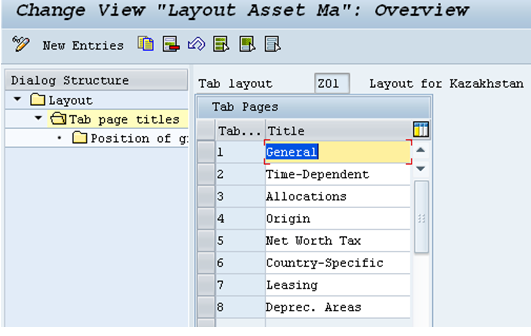
In order to activate country- specific tax fields ,required for Property and Tax reports, create new screen layout for master data record, t-code AOLA:

Check for layouts of master data:
In particular, check for layout ‘6’, which includes country- specific fields, where you want to add all of the tax relevant information.
Assign newly generated tab layout to the asset class (for instance, Vehicle).  Go to t-code AOLK, and do the necessary assignment to asset class. Also system asks you to define transaction group:
Before proceeding with creation assets in Vehicles asset class, you need to activate EA-FIN ECC extension. Use t-code SFW5:
Make sure that all of the relevant Kazakhstan add-on business extensions are also been activated.
So do the activation of EA-FIX extension for Financials:

After you do this, check the status of activation process, once it is been activated, you can activate necessary tax related table fields in: IMG (SPRO)- FI (New)- FI-AA- Master Data- Screen layout- Activate country specific data, where you should activate required fields. Let’s say for transport tax purposes:

There you have it! J Enjoy! J
Ah, check AS01(2 or 3) t-code, and see how that goes:


вторник, 24 декабря 2013 г.

IBAN required countries

Go to table TBE31 and create entry for your country, KZ, for instance ('KZ' key must exist in table T005). So the entry should be for events 00003030 and 00003040. Actually I did this only for 00003040 and it works. Assign CONVERT_BANK_ACCOUNT_2_IBAN_KZ to the event, but before check if this functional module exists via SE37 t-code. 

Then go to FBZP, do all the configurations for bank accounts, it should work.

Ah yes, do the configuration in t-code OY17, current requirements for Kazakhstani area are following:


(oh, good to know about picture inserting feature of 'Blogger' :)))

Maintenance of IBAN can be implemented in RFIBAN02 report.

Et voila, you have it in your bank accounts data.

ps: it took me one whole day to work that sh*t out, but such a great feeling when it works the way you want it to!! :))

понедельник, 23 декабря 2013 г.

Dual confirmation in master data

Have no idea how to fight this 'dual control' sensitivity to changes in master data of vendors. 
I've created special role, with one single t-code in it (FK08), assigned '*' everywhere possible, moreover assigned SAP_ALL, still nothing. On top of that, I've added my username in maintenance of clerks in SPRO, for creating  vendors... 
Still nada...
Then I went straight to table where all the sensitive to changes fields were listed (in SPRO, AR maintenance, Preparation for creating master data...) and deleted them. Then FK08 worked properly, I mean.. after you delete this there's no need to do additional confirmation to changes.
Of course, this is not a solution to the problem. It is just too lazy Monday..

воскресенье, 22 декабря 2013 г.

Emotions, emotions...

I left the car in a carwash, went to the nearest coffee shop, instead of waiting for 40 minutes inside carwash place, life seemed so beautiful and nice, until I came back and heard that music from car is shouting out so loudly, people from neighbouring blocks could easily hear it. I have installed these sound surrounding system, sub woofer thing, and it takes a lot of energy if the engine is not started. So of course, the battery died. Of course. 
I went to the administrator and was just polietly wondering what can we do with it now. I was super poliet. Non of the Lexuses and Land Cruisers in the neighbouring boxes were playing music, only my poor huge baby was entertaining everybody... :)))
To my surprise, administrator started blaming me. I was shocked, I didn't even know for what reason that person is blaming me, for leaving the keys inside the car, for car washer person being that careless about turning on the music that loud? Then I told a person, very calmly 'I am wondering what is the reason of such weird reaction, I am not trying to blame you for what your employee did, I have only one single question I am very worried about right now- how am I supposed to get out of here now?'. 
It is such a pity, cause that car wash was my fav one, it is located right in the middle of the city, close to mountains, such a picturesque place, so convenient, and no ques, no waitinings for hours to get inside, you overpay for this, but that was fine. People...

Gosh, such a stupid, silly thing to write about. But I have no one to complain to about it :(

суббота, 21 декабря 2013 г.

SAP, Closing cockpit

Ok so, for closing purposes most of the clients started using this new tool for closing -Closing cockpit. They were using Schedule or tas manager before, not sure if some of my clients were using closing tools, normally, they just know what to run when close the period.

But nevertheless, international projects, they are demanding on implementation of Closing Cockpit tool.

If you need information on that, go and check AC010 course, just to see how this tool operates (AC010 it is something like... basics of Financial accounting) and then go directly to AC205 which is configuration of Finance I guess. So in AC205 you find 50 pages dedicated on configuration of CLOCO. Also different configuration journals are available in the Internet, so you have the information, you have the basis, all you need is practice :)

When creating task lists there are few steps you need to accomplish: create task template, do org structure assignments, work with the structure of the template (delete, add new subfolders on org. structure unit level, normally company code or controlling area), then based on this task template create task list. Oh yes, don't forget to add tasks while working with template. When creating task list, release the task list, and that's it, you can use it in CLOCO.

Configurations are made in CLOCOC, which is Closing cockpit configuration obviously.

Go to CLOCO, pick your task list, schedule task and there you have it.

In task list you can add programs, transactions, notes and (?) information flows... When you assign program, don't forget to create variant for the program. Interesting, while working with RFBILA00 (which is sending balance confirmation for vendors), I mean, while working with variant to this program, there was interesting thing.... when I tried to add company code from TVARVC table into relevant field, type of the field was 'S' and SAP_FAST_CLOSE_BUKRS_S variable wasn't available for selection. BUT when the type of the field is 'P' then variable is available. I guess this is some sort of program bug which can be fixed by implementing required SAP note.

Also another one problem I've faced, I guess it is pretty much system update problem, not cloco's, when trying to delete tasks from released list's subfolders, you simply don't see 'delete' option. I checked in another system, with EHP7 level, it works properly.

If user t-codes or programs need to be added into CLOCO, go to SCMATRANSACT and SCMAPROGRAMS tables, these are cross company- code relevant tables.

That's about it :)

пятница, 20 декабря 2013 г.

Just thoughts...

Friday evening thoughts about some things...:)
  • Trust your team members. When you trust truthfully, person you trust to can accomplish anything.
  • Don’t be control freak. Surely, you need to control, but don’t exaggerate. Balance.
  • Appreciation. Guys, appreciation is important, I am telling you. Your team is there not only because they are supposed to be there, they are not soldiers ready to get every order, as if they are in army; they are there to help you, first of all. Taking things for granted is always super bad.
  • Trust. Oh, I mentioned that one already, but once again- trust is a basis of productive business relationships, without that one you better off, seriously, cause no point of wasting your and others’ time when you consider ‘others’ as not trustworthy.
  • Talk to your team. Not just during meetings, while asking ‘where we at’s’ and etc., no. Talk, you need to know career goals and personal desires of each single team member, so that you will be able to communicate to these needs. People must be motivated. Motivation leads to inspiration.
  • Be demanding when it comes to deadlines. This is so very important.
  • If your team member needs help- provide help, don’t let small things to stop huge processes.
  • Invest in knowledge of your team. I hate quoting stupid obvious things, but this one is indeed true ‘what if we invest in them and they’ll leave? But what if we don’t invest and they stay?’. Rhetorical question.
  • And yes, one more things, no intrigues are allowed. This is NO- no.